Securing Client Data: Setting Up Your Agency's Local FTP Backup Hub on Windows 11
Hey EShopSet community!
We all know that in the fast-paced world of ecommerce, reliable backups aren't just a nice-to-have; they're a non-negotiable cornerstone of good agency practice. Whether you're managing a complex WooCommerce site or prepping for a major shopify migration project management, having a solid backup strategy can literally save your bacon (and your client relationships).
Recently, a fascinating discussion popped up in a community forum that caught our eye. The original poster was wrestling with a common challenge: how to set up a Windows 11 PC as a dedicated FTP server to receive site backups, specifically from a tool like UpdraftPlus. They were finding a ton of info online, but nothing seemed to click for their specific need to simply download backups onto their local machine.
This isn't just a niche technical query; it's a fundamental operational question for agencies. How do you centralize and secure client site backups efficiently? Let's dive into the community's insights and break down some actionable steps.
The Quest for a Local Backup Hub
The original poster’s goal was clear: they wanted backups to go directly to a Windows PC, transforming it into a sort of personal backup server. This approach has definite advantages for agencies – local control, potentially faster recovery for certain scenarios, and an extra layer of redundancy outside of the hosting environment.
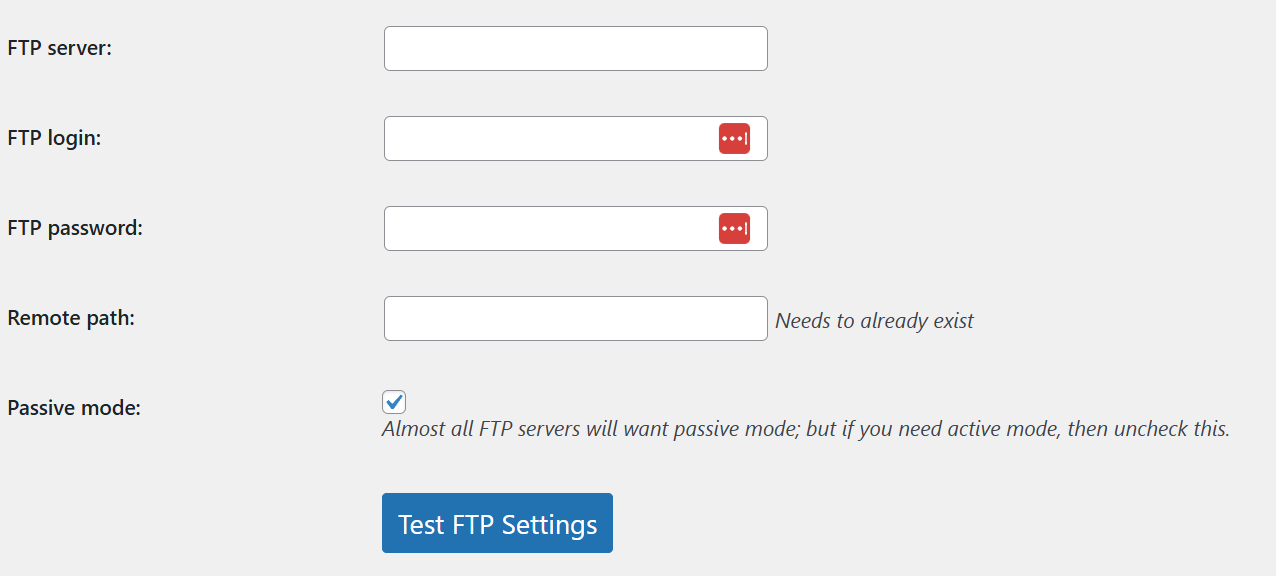
The initial challenge, as the original poster described, was finding straightforward instructions that actually worked. They even shared a screenshot of their UpdraftPlus settings, illustrating where they were trying to point their backups. https://i.postimg.cc/j2t2PsbM/Screenshot-2026-05-15-090806.png
Community-Driven Solutions: FileZilla vs. Built-in IIS
The community quickly jumped in with some excellent suggestions. One respondent immediately pointed to FileZilla Server, calling it "way less painful to set up." Their advice was simple: install FileZilla Server, create a user, point it to your desired backup folder, and UpdraftPlus should connect without much fuss. This is a solid, often recommended third-party solution known for its reliability and user-friendliness.
However, another community member offered a detailed walkthrough for leveraging Windows 11’s built-in FTP server (IIS). This is a fantastic option if you prefer to stick with native Windows features and avoid additional software. Here’s a breakdown of their recommended steps:
Setting Up FTP on Windows 11 with IIS
- Enable FTP Features:
- Open Control Panel → Programs → Turn Windows features on or off.
- Expand Internet Information Services.
- Check FTP Server (make sure FTP Service and FTP Extensibility are enabled).
- Also, ensure IIS Management Console is enabled.
- Configure the FTP Site in IIS Manager:
- Open IIS Manager from your Start menu.
- In the Connections pane, right-click on your server name, then select Add FTP Site...
- Give your FTP site a descriptive name (e.g., "Client Backups").
- Point it to the specific folder on your Windows PC where you want to receive the backup files.
- Set up authentication and authorization rules. You can use existing Windows users and give them read/write permissions on that designated backup folder. This is crucial for security.
- Adjust Windows Firewall:
- Finally, you'll need to allow FTP traffic through your Windows Firewall. Search for "Windows Defender Firewall" in Start, go to "Allow an app or feature through Windows Defender Firewall," and ensure FTP Server is checked for your network type (Private, Public).
Once these steps are complete, you should be able to connect using an FTP client like FileZilla or even directly from Windows Explorer via ftp://your-ip
Beyond the Basics: Dynamic IP Services
A smart follow-up from another respondent brought up an important consideration for anyone looking to make their local FTP server accessible reliably over the internet, especially if your agency isn't using a static IP address: dynamic IP services.
If your internet service provider assigns you a dynamic IP (which changes periodically), your FTP server’s address will also change, making it difficult for tools like UpdraftPlus to consistently connect. Services like No-IP or Duck DNS solve this by providing a consistent hostname that automatically updates whenever your IP address changes. This ensures your backup destination remains stable and reachable.
Why This Matters for Your Agency
For ecommerce agencies, having a robust, well-managed backup system is more than just a technical detail – it's a cornerstone of your service delivery and risk management. Implementing a local FTP backup solution for your client sites, whether using FileZilla Server or Windows IIS, provides several key benefits:
- Enhanced Security & Redundancy: An off-site, local backup adds another layer of protection against hosting failures, cyber-attacks, or accidental deletions.
- Faster Recovery: In some scenarios, having a local copy can speed up restoration processes, minimizing client downtime.
- Centralized Management: It allows your agency to centralize backup storage, making it easier to monitor and manage multiple client sites from a single point. This can be a huge win for your internal agency project hub and streamlines operations.
- Client Trust & Transparency: Demonstrating a proactive and secure backup strategy builds immense trust with your clients, assuring them their valuable data is protected. This is particularly vital when undertaking critical operations like a shopify migration project management, where data integrity is paramount. It also empowers you to provide clear answers when clients ask about data safety, enhancing your role as a reliable client project hub for agencies.
EShopSet Team Comment
This discussion perfectly highlights a common challenge and the power of community-driven solutions. We strongly endorse the move towards robust, agency-controlled backup infrastructure. While both FileZilla Server and Windows IIS are viable, we lean towards FileZilla Server for its dedicated purpose and often simpler configuration for those less familiar with IIS. However, the IIS method is excellent for agencies who prefer a native Windows approach. The key takeaway for agency teams is to prioritize reliable, redundant backup storage as a non-negotiable part of every client engagement, especially for critical projects like platform migrations.
Implementing these solutions might seem like a small technical task, but its impact on your agency’s operational efficiency, client satisfaction, and overall resilience is immense. Think of it as building a stronger foundation for every project you undertake. By mastering these foundational elements, you free up mental bandwidth to focus on growth and innovation, knowing your clients’ data is safe.
Happy backing up!